mirror of
https://github.com/kohya-ss/sd-scripts.git
synced 2026-04-10 15:00:23 +00:00
Compare commits
60 Commits
| Author | SHA1 | Date | |
|---|---|---|---|

|
c2c1261b43 | ||

|
48110bcb23 | ||
|
|
60e5793d5e | ||
|
|
98b0cf0b3d | ||
|
|
88515c2985 | ||
|
|
89f5b3b8e6 | ||
|
|
61ec60a893 | ||
|
|
199a3cbae4 | ||
|
|
74eb43190e | ||
|
|
5851b2b773 | ||
|
|
e4695e9359 | ||

|
dfeadf9e52 | ||
|
|
b3d3f0c8ac | ||
|
|
4fe1dd6a1c | ||
|
|
95ee349e2a | ||
|
|
a75fd3964a | ||
|
|
bf691aef69 | ||
|
|
807bdf9cc9 | ||
|
|
eba142ccb2 | ||
|
|
9fd91d26a3 | ||
|
|
9622082eb8 | ||
|
|
e4f9b2b715 | ||
|
|
895a599d34 | ||

|
58d24ba254 | ||
|
|
974674242e | ||

|
de37fd9906 | ||
|
|
0c4423d9dc | ||
|
|
2e4ce0fdff | ||
|
|
f981dfd38a | ||
|
|
a84ca297bd | ||
|
|
673f9ced47 | ||
|
|
c5aae65003 | ||

|
d8da85b38b | ||
|
|
c4bc435bc4 | ||
|
|
4a7b814700 | ||
|
|
223640e1ae | ||
|
|
fbaf373c8a | ||
|
|
6b62c44022 | ||
|
|
1945fa186d | ||
|
|
82e585cf01 | ||
|
|
80af4c0c42 | ||
|
|
9f1d3aca24 | ||
|
|
2efced0a9a | ||
|
|
40d1bf3809 | ||
|
|
fac1813ac0 | ||
|
|
cbfe8126d6 | ||
|
|
54928fac7b | ||
|
|
39a0293800 | ||
|
|
4dd22f4dc8 | ||
|
|
1b222dbf9b | ||
|
|
d62725b644 | ||
|
|
dcd101b3d5 | ||
|
|
f56988b252 | ||
|
|
6d10233a53 | ||
|
|
4c35006731 | ||
|
|
e31177adf3 | ||
|
|
6b522b34c1 | ||
|
|
305bda2928 | ||

|
85d8b49129 | ||
|
|
61a61c51ee |
16
README-ja.md
16
README-ja.md
@@ -89,14 +89,18 @@ accelerate configの質問には以下のように答えてください。(bf1
|
|||||||
※0.15.0から日本語環境では選択のためにカーソルキーを押すと落ちます(……)。数字キーの0、1、2……で選択できますので、そちらを使ってください。
|
※0.15.0から日本語環境では選択のためにカーソルキーを押すと落ちます(……)。数字キーの0、1、2……で選択できますので、そちらを使ってください。
|
||||||
|
|
||||||
```txt
|
```txt
|
||||||
- 0
|
- This machine
|
||||||
- 0
|
- No distributed training
|
||||||
- NO
|
- NO
|
||||||
- NO
|
- NO
|
||||||
- All
|
- NO
|
||||||
|
- all
|
||||||
- fp16
|
- fp16
|
||||||
```
|
```
|
||||||
|
|
||||||
|
※場合によって ``ValueError: fp16 mixed precision requires a GPU`` というエラーが出ることがあるようです。この場合、6番目の質問(
|
||||||
|
``What GPU(s) (by id) should be used for training on this machine as a comma-seperated list? [all]:``)に「0」と答えてください。(id `0`のGPUが使われます。)
|
||||||
|
|
||||||
## アップグレード
|
## アップグレード
|
||||||
|
|
||||||
新しいリリースがあった場合、以下のコマンドで更新できます。
|
新しいリリースがあった場合、以下のコマンドで更新できます。
|
||||||
@@ -110,9 +114,13 @@ pip install --upgrade -r <requirement file name>
|
|||||||
|
|
||||||
コマンドが成功すれば新しいバージョンが使用できます。
|
コマンドが成功すれば新しいバージョンが使用できます。
|
||||||
|
|
||||||
|
## 謝意
|
||||||
|
|
||||||
|
LoRAの実装は[cloneofsimo氏のリポジトリ](https://github.com/cloneofsimo/lora)を基にしたものです。感謝申し上げます。
|
||||||
|
|
||||||
## ライセンス
|
## ライセンス
|
||||||
|
|
||||||
スクリプトのライセンスはASL 2.0ですが、一部他のライセンスのコードを含みます。
|
スクリプトのライセンスはASL 2.0ですが(Diffusersおよびcloneofsimo氏のリポジトリ由来のものも同様)、一部他のライセンスのコードを含みます。
|
||||||
|
|
||||||
[Memory Efficient Attention Pytorch](https://github.com/lucidrains/memory-efficient-attention-pytorch): MIT
|
[Memory Efficient Attention Pytorch](https://github.com/lucidrains/memory-efficient-attention-pytorch): MIT
|
||||||
|
|
||||||
|
|||||||
113
README.md
113
README.md
@@ -1,13 +1,31 @@
|
|||||||
This repository contains training, generation and utility scripts for Stable Diffusion.
|
This repository contains training, generation and utility scripts for Stable Diffusion.
|
||||||
|
|
||||||
|
## Updates
|
||||||
|
|
||||||
|
- January 14, 2023, 2023/1/14
|
||||||
|
- Fix loading some VAE or .safetensors as VAE is failed for ``--vae`` option. Thanks to Fannovel16!
|
||||||
|
- Add negative prompt scaling for ``gen_img_diffusers.py`` You can set another conditioning scale to the negative prompt with ``--negative_scale`` option, and ``--nl`` option for the prompt. Thanks to laksjdjf!
|
||||||
|
- ``--vae`` オプションに一部のVAEや .safetensors 形式のモデルを指定するとエラーになる不具合を修正しました。Fannovel16氏に感謝します。
|
||||||
|
- ``gen_img_diffusers.py`` に、ネガティブプロンプトに異なる guidance scale を設定できる ``--negative_scale`` オプションを追加しました。プロンプトからは ``--nl`` で指定できます。laksjdjf氏に感謝します。
|
||||||
|
- January 12, 2023, 2023/1/12
|
||||||
|
- Metadata is saved on the model (.safetensors only) (model name, VAE name, training steps, learning rate etc.) The metadata will be able to inspect by sd-webui-additional-networks extension in near future. If you do not want to save it, specify ``no_metadata`` option.
|
||||||
|
- メタデータが保存されるようになりました( .safetensors 形式の場合のみ)(モデル名、VAE 名、ステップ数、学習率など)。近日中に拡張から確認できるようになる予定です。メタデータを保存したくない場合は ``no_metadata`` オプションをしてしてください。
|
||||||
|
|
||||||
|
**January 9, 2023: Important information about the update can be found at [the end of the page](#updates-jan-9-2023).**
|
||||||
|
|
||||||
|
**20231/1/9: 更新情報が[ページ末尾](#更新情報-202319)にありますのでご覧ください。**
|
||||||
|
|
||||||
[日本語版README](./README-ja.md)
|
[日本語版README](./README-ja.md)
|
||||||
|
|
||||||
|
##
|
||||||
|
|
||||||
For easier use (GUI and PowerShell scripts etc...), please visit [the repository maintained by bmaltais](https://github.com/bmaltais/kohya_ss). Thanks to @bmaltais!
|
For easier use (GUI and PowerShell scripts etc...), please visit [the repository maintained by bmaltais](https://github.com/bmaltais/kohya_ss). Thanks to @bmaltais!
|
||||||
|
|
||||||
This repository contains the scripts for:
|
This repository contains the scripts for:
|
||||||
|
|
||||||
* DreamBooth training, including U-Net and Text Encoder
|
* DreamBooth training, including U-Net and Text Encoder
|
||||||
* fine-tuning (native training), including U-Net and Text Encoder
|
* fine-tuning (native training), including U-Net and Text Encoder
|
||||||
|
* LoRA training
|
||||||
* image generation
|
* image generation
|
||||||
* model conversion (supports 1.x and 2.x, Stable Diffision ckpt/safetensors and Diffusers)
|
* model conversion (supports 1.x and 2.x, Stable Diffision ckpt/safetensors and Diffusers)
|
||||||
|
|
||||||
@@ -21,7 +39,7 @@ The scripts are tested with PyTorch 1.12.1 and 1.13.0, Diffusers 0.10.2.
|
|||||||
|
|
||||||
All documents are in Japanese currently, and CUI based.
|
All documents are in Japanese currently, and CUI based.
|
||||||
|
|
||||||
* note.com [Environment setup and DreamBooth training guide](https://note.com/kohya_ss/n/nba4eceaa4594)
|
* [DreamBooth training guide](./train_db_README-ja.md)
|
||||||
* [Step by Step fine-tuning guide](./fine_tune_README_ja.md):
|
* [Step by Step fine-tuning guide](./fine_tune_README_ja.md):
|
||||||
Including BLIP captioning and tagging by DeepDanbooru or WD14 tagger
|
Including BLIP captioning and tagging by DeepDanbooru or WD14 tagger
|
||||||
* [training LoRA](./train_network_README-ja.md)
|
* [training LoRA](./train_network_README-ja.md)
|
||||||
@@ -67,14 +85,20 @@ accelerate config
|
|||||||
Answers to accelerate config:
|
Answers to accelerate config:
|
||||||
|
|
||||||
```txt
|
```txt
|
||||||
- 0
|
- This machine
|
||||||
- 0
|
- No distributed training
|
||||||
- NO
|
- NO
|
||||||
- NO
|
- NO
|
||||||
- All
|
- NO
|
||||||
|
- all
|
||||||
- fp16
|
- fp16
|
||||||
```
|
```
|
||||||
|
|
||||||
|
note: Some user reports ``ValueError: fp16 mixed precision requires a GPU`` is occured in training. In this case, answer `0` for the 6th question:
|
||||||
|
``What GPU(s) (by id) should be used for training on this machine as a comma-seperated list? [all]:``
|
||||||
|
|
||||||
|
(Single GPU with id `0` will be used.)
|
||||||
|
|
||||||
## Upgrade
|
## Upgrade
|
||||||
|
|
||||||
When a new release comes out you can upgrade your repo with the following command:
|
When a new release comes out you can upgrade your repo with the following command:
|
||||||
@@ -88,9 +112,13 @@ pip install --upgrade -r requirements.txt
|
|||||||
|
|
||||||
Once the commands have completed successfully you should be ready to use the new version.
|
Once the commands have completed successfully you should be ready to use the new version.
|
||||||
|
|
||||||
|
## Credits
|
||||||
|
|
||||||
|
The implementation for LoRA is based on [cloneofsimo's repo](https://github.com/cloneofsimo/lora). Thank you for great work!!!
|
||||||
|
|
||||||
## License
|
## License
|
||||||
|
|
||||||
The majority of scripts is licensed under ASL 2.0 (including codes from Diffusers), however portions of the project are available under separate license terms:
|
The majority of scripts is licensed under ASL 2.0 (including codes from Diffusers, cloneofsimo's), however portions of the project are available under separate license terms:
|
||||||
|
|
||||||
[Memory Efficient Attention Pytorch](https://github.com/lucidrains/memory-efficient-attention-pytorch): MIT
|
[Memory Efficient Attention Pytorch](https://github.com/lucidrains/memory-efficient-attention-pytorch): MIT
|
||||||
|
|
||||||
@@ -98,3 +126,78 @@ The majority of scripts is licensed under ASL 2.0 (including codes from Diffuser
|
|||||||
|
|
||||||
[BLIP](https://github.com/salesforce/BLIP): BSD-3-Clause
|
[BLIP](https://github.com/salesforce/BLIP): BSD-3-Clause
|
||||||
|
|
||||||
|
|
||||||
|
# Updates: Jan 9. 2023
|
||||||
|
|
||||||
|
All training scripts are updated.
|
||||||
|
|
||||||
|
## Breaking Changes
|
||||||
|
|
||||||
|
- The ``fine_tuning`` option in ``train_db.py`` is removed. Please use DreamBooth with captions or ``fine_tune.py``.
|
||||||
|
- The Hypernet feature in ``fine_tune.py`` is removed, will be implemented in ``train_network.py`` in future.
|
||||||
|
|
||||||
|
## Features, Improvements and Bug Fixes
|
||||||
|
|
||||||
|
### for all script: train_db.py, fine_tune.py and train_network.py
|
||||||
|
|
||||||
|
- Added ``output_name`` option. The name of output file can be specified.
|
||||||
|
- With ``--output_name style1``, the output file is like ``style1_000001.ckpt`` (or ``.safetensors``) for each epoch and ``style1.ckpt`` for last.
|
||||||
|
- If ommitted (default), same to previous. ``epoch-000001.ckpt`` and ``last.ckpt``.
|
||||||
|
- Added ``save_last_n_epochs`` option. Keep only latest n files for the checkpoints and the states. Older files are removed. (Thanks to shirayu!)
|
||||||
|
- If the options are ``--save_every_n_epochs=2 --save_last_n_epochs=3``, in the end of epoch 8, ``epoch-000008.ckpt`` is created and ``epoch-000002.ckpt`` is removed.
|
||||||
|
|
||||||
|
### train_db.py
|
||||||
|
|
||||||
|
- Added ``max_token_length`` option. Captions can have more than 75 tokens.
|
||||||
|
|
||||||
|
### fine_tune.py
|
||||||
|
|
||||||
|
- The script now works without .npz files. If .npz is not found, the scripts get the latents with VAE.
|
||||||
|
- You can omit ``prepare_buckets_latents.py`` in preprocessing. However, it is recommended if you train more than 1 or 2 epochs.
|
||||||
|
- ``--resolution`` option is required to specify the training resolution.
|
||||||
|
- Added ``cache_latents`` and ``color_aug`` options.
|
||||||
|
|
||||||
|
### train_network.py
|
||||||
|
|
||||||
|
- Now ``--gradient_checkpointing`` is effective for U-Net and Text Encoder.
|
||||||
|
- The memory usage is reduced. The larger batch size is avilable, but the training speed will be slow.
|
||||||
|
- The training might be possible with 6GB VRAM for dimension=4 with batch size=1.
|
||||||
|
|
||||||
|
Documents are not updated now, I will update one by one.
|
||||||
|
|
||||||
|
# 更新情報 (2023/1/9)
|
||||||
|
|
||||||
|
学習スクリプトを更新しました。
|
||||||
|
|
||||||
|
## 削除された機能
|
||||||
|
- ``train_db.py`` の ``fine_tuning`` は削除されました。キャプション付きの DreamBooth または ``fine_tune.py`` を使ってください。
|
||||||
|
- ``fine_tune.py`` の Hypernet学習の機能は削除されました。将来的に``train_network.py``に追加される予定です。
|
||||||
|
|
||||||
|
## その他の機能追加、バグ修正など
|
||||||
|
|
||||||
|
### 学習スクリプトに共通: train_db.py, fine_tune.py and train_network.py
|
||||||
|
|
||||||
|
- ``output_name``オプションを追加しました。保存されるモデルファイルの名前を指定できます。
|
||||||
|
- ``--output_name style1``と指定すると、エポックごとに保存されるファイル名は``style1_000001.ckpt`` (または ``.safetensors``) に、最後に保存されるファイル名は``style1.ckpt``になります。
|
||||||
|
- 省略時は今までと同じです(``epoch-000001.ckpt``および``last.ckpt``)。
|
||||||
|
- ``save_last_n_epochs``オプションを追加しました。最新の n ファイル、stateだけ保存し、古いものは削除します。(shirayu氏に感謝します。)
|
||||||
|
- たとえば``--save_every_n_epochs=2 --save_last_n_epochs=3``と指定した時、8エポック目の終了時には、``epoch-000008.ckpt``が保存され``epoch-000002.ckpt``が削除されます。
|
||||||
|
|
||||||
|
### train_db.py
|
||||||
|
|
||||||
|
- ``max_token_length``オプションを追加しました。75文字を超えるキャプションが使えるようになります。
|
||||||
|
|
||||||
|
### fine_tune.py
|
||||||
|
|
||||||
|
- .npzファイルがなくても動作するようになりました。.npzファイルがない場合、VAEからlatentsを取得して動作します。
|
||||||
|
- ``prepare_buckets_latents.py``を前処理で実行しなくても良くなります。ただし事前取得をしておいたほうが、2エポック以上学習する場合にはトータルで高速です。
|
||||||
|
- この場合、解像度を指定するために``--resolution``オプションが必要です。
|
||||||
|
- ``cache_latents``と``color_aug``オプションを追加しました。
|
||||||
|
|
||||||
|
### train_network.py
|
||||||
|
|
||||||
|
- ``--gradient_checkpointing``がU-NetとText Encoderにも有効になりました。
|
||||||
|
- メモリ消費が減ります。バッチサイズを大きくできますが、トータルでの学習時間は長くなるかもしれません。
|
||||||
|
- dimension=4のLoRAはバッチサイズ1で6GB VRAMで学習できるかもしれません。
|
||||||
|
|
||||||
|
ドキュメントは未更新ですが少しずつ更新の予定です。
|
||||||
|
|||||||
933
fine_tune.py
933
fine_tune.py
File diff suppressed because it is too large
Load Diff
@@ -1,38 +1,3 @@
|
|||||||
# txt2img with Diffusers: supports SD checkpoints, EulerScheduler, clip-skip, 225 tokens, Hypernetwork etc...
|
|
||||||
|
|
||||||
# v2: CLIP guided Stable Diffusion, Image guided Stable Diffusion, highres. fix
|
|
||||||
# v3: Add dpmsolver/dpmsolver++, add VAE loading, add upscale, add 'bf16', fix the issue network_mul is not working
|
|
||||||
# v4: SD2.0 support (new U-Net/text encoder/tokenizer), simplify by DiffUsers 0.9.0, no_preview in interactive mode
|
|
||||||
# v5: fix clip_sample=True for scheduler, add VGG guidance
|
|
||||||
# v6: refactor to use model util, load VAE without vae folder, support safe tensors
|
|
||||||
# v7: add use_original_file_name and iter_same_seed option, change vgg16 guide input image size,
|
|
||||||
# Diffusers 0.10.0 (support new schedulers (dpm_2, dpm_2_a, heun, dpmsingle), supports all scheduler in v-prediction)
|
|
||||||
# v8: accept wildcard for ckpt name (when only one file is matched), fix a bug app crushes because PIL image doesn't have filename attr sometimes,
|
|
||||||
# v9: sort file names, fix an issue in img2img when prompt from metadata with images_per_prompt>1
|
|
||||||
# v10: fix app crashes when different image size in prompts
|
|
||||||
|
|
||||||
# Copyright 2022 kohya_ss @kohya_ss
|
|
||||||
#
|
|
||||||
# Licensed under the Apache License, Version 2.0 (the "License");
|
|
||||||
# you may not use this file except in compliance with the License.
|
|
||||||
# You may obtain a copy of the License at
|
|
||||||
#
|
|
||||||
# http://www.apache.org/licenses/LICENSE-2.0
|
|
||||||
#
|
|
||||||
# Unless required by applicable law or agreed to in writing, software
|
|
||||||
# distributed under the License is distributed on an "AS IS" BASIS,
|
|
||||||
# WITHOUT WARRANTIES OR CONDITIONS OF ANY KIND, either express or implied.
|
|
||||||
# See the License for the specific language governing permissions and
|
|
||||||
# limitations under the License.
|
|
||||||
|
|
||||||
# license of included scripts:
|
|
||||||
|
|
||||||
# FlashAttention: based on https://github.com/lucidrains/memory-efficient-attention-pytorch/blob/main/memory_efficient_attention_pytorch/flash_attention.py
|
|
||||||
# MIT https://github.com/lucidrains/memory-efficient-attention-pytorch/blob/main/LICENSE
|
|
||||||
|
|
||||||
# Diffusers (model conversion, CLIP guided stable diffusion, schedulers etc.):
|
|
||||||
# ASL 2.0 https://github.com/huggingface/diffusers/blob/main/LICENSE
|
|
||||||
|
|
||||||
"""
|
"""
|
||||||
VGG(
|
VGG(
|
||||||
(features): Sequential(
|
(features): Sequential(
|
||||||
@@ -81,11 +46,13 @@ VGG(
|
|||||||
)
|
)
|
||||||
"""
|
"""
|
||||||
|
|
||||||
|
import json
|
||||||
from typing import List, Optional, Union
|
from typing import List, Optional, Union
|
||||||
import glob
|
import glob
|
||||||
import importlib
|
import importlib
|
||||||
import inspect
|
import inspect
|
||||||
import time
|
import time
|
||||||
|
import zipfile
|
||||||
from diffusers.utils import deprecate
|
from diffusers.utils import deprecate
|
||||||
from diffusers.configuration_utils import FrozenDict
|
from diffusers.configuration_utils import FrozenDict
|
||||||
import argparse
|
import argparse
|
||||||
@@ -517,7 +484,7 @@ class PipelineLike():
|
|||||||
self.vgg16_feat_model = torchvision.models._utils.IntermediateLayerGetter(vgg16_model.features, return_layers=return_layers)
|
self.vgg16_feat_model = torchvision.models._utils.IntermediateLayerGetter(vgg16_model.features, return_layers=return_layers)
|
||||||
self.vgg16_normalize = transforms.Normalize(mean=VGG16_IMAGE_MEAN, std=VGG16_IMAGE_STD)
|
self.vgg16_normalize = transforms.Normalize(mean=VGG16_IMAGE_MEAN, std=VGG16_IMAGE_STD)
|
||||||
|
|
||||||
# region xformersとか使う部分:独自に書き換えるので関係なし
|
# region xformersとか使う部分:独自に書き換えるので関係なし
|
||||||
def enable_xformers_memory_efficient_attention(self):
|
def enable_xformers_memory_efficient_attention(self):
|
||||||
r"""
|
r"""
|
||||||
Enable memory efficient attention as implemented in xformers.
|
Enable memory efficient attention as implemented in xformers.
|
||||||
@@ -590,6 +557,7 @@ class PipelineLike():
|
|||||||
width: int = 512,
|
width: int = 512,
|
||||||
num_inference_steps: int = 50,
|
num_inference_steps: int = 50,
|
||||||
guidance_scale: float = 7.5,
|
guidance_scale: float = 7.5,
|
||||||
|
negative_scale: float = None,
|
||||||
strength: float = 0.8,
|
strength: float = 0.8,
|
||||||
# num_images_per_prompt: Optional[int] = 1,
|
# num_images_per_prompt: Optional[int] = 1,
|
||||||
eta: float = 0.0,
|
eta: float = 0.0,
|
||||||
@@ -708,6 +676,11 @@ class PipelineLike():
|
|||||||
# of the Imagen paper: https://arxiv.org/pdf/2205.11487.pdf . `guidance_scale = 1`
|
# of the Imagen paper: https://arxiv.org/pdf/2205.11487.pdf . `guidance_scale = 1`
|
||||||
# corresponds to doing no classifier free guidance.
|
# corresponds to doing no classifier free guidance.
|
||||||
do_classifier_free_guidance = guidance_scale > 1.0
|
do_classifier_free_guidance = guidance_scale > 1.0
|
||||||
|
|
||||||
|
if not do_classifier_free_guidance and negative_scale is not None:
|
||||||
|
print(f"negative_scale is ignored if guidance scalle <= 1.0")
|
||||||
|
negative_scale = None
|
||||||
|
|
||||||
# get unconditional embeddings for classifier free guidance
|
# get unconditional embeddings for classifier free guidance
|
||||||
if negative_prompt is None:
|
if negative_prompt is None:
|
||||||
negative_prompt = [""] * batch_size
|
negative_prompt = [""] * batch_size
|
||||||
@@ -729,8 +702,21 @@ class PipelineLike():
|
|||||||
**kwargs,
|
**kwargs,
|
||||||
)
|
)
|
||||||
|
|
||||||
|
if negative_scale is not None:
|
||||||
|
_, real_uncond_embeddings, _ = get_weighted_text_embeddings(
|
||||||
|
pipe=self,
|
||||||
|
prompt=prompt, # こちらのトークン長に合わせてuncondを作るので75トークン超で必須
|
||||||
|
uncond_prompt=[""]*batch_size,
|
||||||
|
max_embeddings_multiples=max_embeddings_multiples,
|
||||||
|
clip_skip=self.clip_skip,
|
||||||
|
**kwargs,
|
||||||
|
)
|
||||||
|
|
||||||
if do_classifier_free_guidance:
|
if do_classifier_free_guidance:
|
||||||
text_embeddings = torch.cat([uncond_embeddings, text_embeddings])
|
if negative_scale is None:
|
||||||
|
text_embeddings = torch.cat([uncond_embeddings, text_embeddings])
|
||||||
|
else:
|
||||||
|
text_embeddings = torch.cat([uncond_embeddings, text_embeddings, real_uncond_embeddings])
|
||||||
|
|
||||||
# CLIP guidanceで使用するembeddingsを取得する
|
# CLIP guidanceで使用するembeddingsを取得する
|
||||||
if self.clip_guidance_scale > 0:
|
if self.clip_guidance_scale > 0:
|
||||||
@@ -861,22 +847,28 @@ class PipelineLike():
|
|||||||
if accepts_eta:
|
if accepts_eta:
|
||||||
extra_step_kwargs["eta"] = eta
|
extra_step_kwargs["eta"] = eta
|
||||||
|
|
||||||
|
num_latent_input = (3 if negative_scale is not None else 2) if do_classifier_free_guidance else 1
|
||||||
for i, t in enumerate(tqdm(timesteps)):
|
for i, t in enumerate(tqdm(timesteps)):
|
||||||
# expand the latents if we are doing classifier free guidance
|
# expand the latents if we are doing classifier free guidance
|
||||||
latent_model_input = latents.repeat((2, 1, 1, 1)) if do_classifier_free_guidance else latents
|
latent_model_input = latents.repeat((num_latent_input, 1, 1, 1))
|
||||||
latent_model_input = self.scheduler.scale_model_input(latent_model_input, t)
|
latent_model_input = self.scheduler.scale_model_input(latent_model_input, t)
|
||||||
|
|
||||||
# predict the noise residual
|
# predict the noise residual
|
||||||
noise_pred = self.unet(latent_model_input, t, encoder_hidden_states=text_embeddings).sample
|
noise_pred = self.unet(latent_model_input, t, encoder_hidden_states=text_embeddings).sample
|
||||||
|
|
||||||
# perform guidance
|
# perform guidance
|
||||||
if do_classifier_free_guidance:
|
if do_classifier_free_guidance:
|
||||||
noise_pred_uncond, noise_pred_text = noise_pred.chunk(2)
|
if negative_scale is None:
|
||||||
noise_pred = noise_pred_uncond + guidance_scale * (noise_pred_text - noise_pred_uncond)
|
noise_pred_uncond, noise_pred_text = noise_pred.chunk(num_latent_input) # uncond by negative prompt
|
||||||
|
noise_pred = noise_pred_uncond + guidance_scale * (noise_pred_text - noise_pred_uncond)
|
||||||
|
else:
|
||||||
|
noise_pred_negative, noise_pred_text, noise_pred_uncond = noise_pred.chunk(num_latent_input) # uncond is real uncond
|
||||||
|
noise_pred = noise_pred_uncond + guidance_scale * \
|
||||||
|
(noise_pred_text - noise_pred_uncond) - negative_scale * (noise_pred_negative - noise_pred_uncond)
|
||||||
|
|
||||||
# perform clip guidance
|
# perform clip guidance
|
||||||
if self.clip_guidance_scale > 0 or self.clip_image_guidance_scale > 0 or self.vgg16_guidance_scale > 0:
|
if self.clip_guidance_scale > 0 or self.clip_image_guidance_scale > 0 or self.vgg16_guidance_scale > 0:
|
||||||
text_embeddings_for_guidance = (text_embeddings.chunk(2)[1] if do_classifier_free_guidance else text_embeddings)
|
text_embeddings_for_guidance = (text_embeddings.chunk(num_latent_input)[
|
||||||
|
1] if do_classifier_free_guidance else text_embeddings)
|
||||||
|
|
||||||
if self.clip_guidance_scale > 0:
|
if self.clip_guidance_scale > 0:
|
||||||
noise_pred, latents = self.cond_fn(latents, t, i, text_embeddings_for_guidance, noise_pred,
|
noise_pred, latents = self.cond_fn(latents, t, i, text_embeddings_for_guidance, noise_pred,
|
||||||
@@ -1982,26 +1974,50 @@ def main(args):
|
|||||||
vgg16_model.to(dtype).to(device)
|
vgg16_model.to(dtype).to(device)
|
||||||
|
|
||||||
# networkを組み込む
|
# networkを組み込む
|
||||||
if args.network_module is not None:
|
if args.network_module:
|
||||||
# assert not args.diffusers_xformers, "cannot use network with diffusers_xformers / diffusers_xformers指定時はnetworkは利用できません"
|
networks = []
|
||||||
|
for i, network_module in enumerate(args.network_module):
|
||||||
|
print("import network module:", network_module)
|
||||||
|
imported_module = importlib.import_module(network_module)
|
||||||
|
|
||||||
print("import network module:", args.network_module)
|
network_mul = 1.0 if args.network_mul is None or len(args.network_mul) <= i else args.network_mul[i]
|
||||||
network_module = importlib.import_module(args.network_module)
|
network_dim = None if args.network_dim is None or len(args.network_dim) <= i else args.network_dim[i]
|
||||||
|
|
||||||
network = network_module.create_network(args.network_mul, args.network_dim, vae,text_encoder, unet) # , **net_kwargs)
|
net_kwargs = {}
|
||||||
if network is None:
|
if args.network_args and i < len(args.network_args):
|
||||||
return
|
network_args = args.network_args[i]
|
||||||
|
# TODO escape special chars
|
||||||
|
network_args = network_args.split(";")
|
||||||
|
for net_arg in network_args:
|
||||||
|
key, value = net_arg.split("=")
|
||||||
|
net_kwargs[key] = value
|
||||||
|
|
||||||
print("load network weights from:", args.network_weights)
|
network = imported_module.create_network(network_mul, network_dim, vae, text_encoder, unet, **net_kwargs)
|
||||||
network.load_weights(args.network_weights)
|
if network is None:
|
||||||
|
return
|
||||||
|
|
||||||
network.apply_to(text_encoder, unet)
|
if args.network_weights and i < len(args.network_weights):
|
||||||
|
network_weight = args.network_weights[i]
|
||||||
|
print("load network weights from:", network_weight)
|
||||||
|
|
||||||
if args.opt_channels_last:
|
if os.path.splitext(network_weight)[1] == '.safetensors':
|
||||||
network.to(memory_format=torch.channels_last)
|
from safetensors.torch import safe_open
|
||||||
network.to(dtype).to(device)
|
with safe_open(network_weight, framework="pt") as f:
|
||||||
|
metadata = f.metadata()
|
||||||
|
if metadata is not None:
|
||||||
|
print(f"metadata for: {network_weight}: {metadata}")
|
||||||
|
|
||||||
|
network.load_weights(network_weight)
|
||||||
|
|
||||||
|
network.apply_to(text_encoder, unet)
|
||||||
|
|
||||||
|
if args.opt_channels_last:
|
||||||
|
network.to(memory_format=torch.channels_last)
|
||||||
|
network.to(dtype).to(device)
|
||||||
|
|
||||||
|
networks.append(network)
|
||||||
else:
|
else:
|
||||||
network = None
|
networks = []
|
||||||
|
|
||||||
if args.opt_channels_last:
|
if args.opt_channels_last:
|
||||||
print(f"set optimizing: channels last")
|
print(f"set optimizing: channels last")
|
||||||
@@ -2010,8 +2026,9 @@ def main(args):
|
|||||||
unet.to(memory_format=torch.channels_last)
|
unet.to(memory_format=torch.channels_last)
|
||||||
if clip_model is not None:
|
if clip_model is not None:
|
||||||
clip_model.to(memory_format=torch.channels_last)
|
clip_model.to(memory_format=torch.channels_last)
|
||||||
if network is not None:
|
if networks:
|
||||||
network.to(memory_format=torch.channels_last)
|
for network in networks:
|
||||||
|
network.to(memory_format=torch.channels_last)
|
||||||
if vgg16_model is not None:
|
if vgg16_model is not None:
|
||||||
vgg16_model.to(memory_format=torch.channels_last)
|
vgg16_model.to(memory_format=torch.channels_last)
|
||||||
|
|
||||||
@@ -2053,7 +2070,7 @@ def main(args):
|
|||||||
print(f"convert image to RGB from {image.mode}: {p}")
|
print(f"convert image to RGB from {image.mode}: {p}")
|
||||||
image = image.convert("RGB")
|
image = image.convert("RGB")
|
||||||
images.append(image)
|
images.append(image)
|
||||||
|
|
||||||
return images
|
return images
|
||||||
|
|
||||||
def resize_images(imgs, size):
|
def resize_images(imgs, size):
|
||||||
@@ -2154,12 +2171,12 @@ def main(args):
|
|||||||
# 1st stageのバッチを作成して呼び出す
|
# 1st stageのバッチを作成して呼び出す
|
||||||
print("process 1st stage1")
|
print("process 1st stage1")
|
||||||
batch_1st = []
|
batch_1st = []
|
||||||
for params1, (width, height, steps, scale, strength) in batch:
|
for params1, (width, height, steps, scale, negative_scale, strength) in batch:
|
||||||
width_1st = int(width * args.highres_fix_scale + .5)
|
width_1st = int(width * args.highres_fix_scale + .5)
|
||||||
height_1st = int(height * args.highres_fix_scale + .5)
|
height_1st = int(height * args.highres_fix_scale + .5)
|
||||||
width_1st = width_1st - width_1st % 32
|
width_1st = width_1st - width_1st % 32
|
||||||
height_1st = height_1st - height_1st % 32
|
height_1st = height_1st - height_1st % 32
|
||||||
batch_1st.append((params1, (width_1st, height_1st, args.highres_fix_steps, scale, strength)))
|
batch_1st.append((params1, (width_1st, height_1st, args.highres_fix_steps, scale, negative_scale, strength)))
|
||||||
images_1st = process_batch(batch_1st, True, True)
|
images_1st = process_batch(batch_1st, True, True)
|
||||||
|
|
||||||
# 2nd stageのバッチを作成して以下処理する
|
# 2nd stageのバッチを作成して以下処理する
|
||||||
@@ -2171,7 +2188,8 @@ def main(args):
|
|||||||
batch_2nd.append(((step, prompt, negative_prompt, seed+1, image, None, clip_prompt, guide_image), params2))
|
batch_2nd.append(((step, prompt, negative_prompt, seed+1, image, None, clip_prompt, guide_image), params2))
|
||||||
batch = batch_2nd
|
batch = batch_2nd
|
||||||
|
|
||||||
(step_first, _, _, _, init_image, mask_image, _, guide_image), (width, height, steps, scale, strength) = batch[0]
|
(step_first, _, _, _, init_image, mask_image, _, guide_image), (width,
|
||||||
|
height, steps, scale, negative_scale, strength) = batch[0]
|
||||||
noise_shape = (LATENT_CHANNELS, height // DOWNSAMPLING_FACTOR, width // DOWNSAMPLING_FACTOR)
|
noise_shape = (LATENT_CHANNELS, height // DOWNSAMPLING_FACTOR, width // DOWNSAMPLING_FACTOR)
|
||||||
|
|
||||||
prompts = []
|
prompts = []
|
||||||
@@ -2247,7 +2265,7 @@ def main(args):
|
|||||||
guide_images = guide_images[0]
|
guide_images = guide_images[0]
|
||||||
|
|
||||||
# generate
|
# generate
|
||||||
images = pipe(prompts, negative_prompts, init_images, mask_images, height, width, steps, scale, strength, latents=start_code,
|
images = pipe(prompts, negative_prompts, init_images, mask_images, height, width, steps, scale, negative_scale, strength, latents=start_code,
|
||||||
output_type='pil', max_embeddings_multiples=max_embeddings_multiples, img2img_noise=i2i_noises, clip_prompts=clip_prompts, clip_guide_images=guide_images)[0]
|
output_type='pil', max_embeddings_multiples=max_embeddings_multiples, img2img_noise=i2i_noises, clip_prompts=clip_prompts, clip_guide_images=guide_images)[0]
|
||||||
if highres_1st and not args.highres_fix_save_1st:
|
if highres_1st and not args.highres_fix_save_1st:
|
||||||
return images
|
return images
|
||||||
@@ -2264,6 +2282,8 @@ def main(args):
|
|||||||
metadata.add_text("scale", str(scale))
|
metadata.add_text("scale", str(scale))
|
||||||
if negative_prompt is not None:
|
if negative_prompt is not None:
|
||||||
metadata.add_text("negative-prompt", negative_prompt)
|
metadata.add_text("negative-prompt", negative_prompt)
|
||||||
|
if negative_scale is not None:
|
||||||
|
metadata.add_text("negative-scale", str(negative_scale))
|
||||||
if clip_prompt is not None:
|
if clip_prompt is not None:
|
||||||
metadata.add_text("clip-prompt", clip_prompt)
|
metadata.add_text("clip-prompt", clip_prompt)
|
||||||
|
|
||||||
@@ -2316,6 +2336,7 @@ def main(args):
|
|||||||
width = args.W
|
width = args.W
|
||||||
height = args.H
|
height = args.H
|
||||||
scale = args.scale
|
scale = args.scale
|
||||||
|
negative_scale = args.negative_scale
|
||||||
steps = args.steps
|
steps = args.steps
|
||||||
seeds = None
|
seeds = None
|
||||||
strength = 0.8 if args.strength is None else args.strength
|
strength = 0.8 if args.strength is None else args.strength
|
||||||
@@ -2358,6 +2379,15 @@ def main(args):
|
|||||||
print(f"scale: {scale}")
|
print(f"scale: {scale}")
|
||||||
continue
|
continue
|
||||||
|
|
||||||
|
m = re.match(r'nl ([\d\.]+|none|None)', parg, re.IGNORECASE)
|
||||||
|
if m: # negative scale
|
||||||
|
if m.group(1).lower() == 'none':
|
||||||
|
negative_scale = None
|
||||||
|
else:
|
||||||
|
negative_scale = float(m.group(1))
|
||||||
|
print(f"negative scale: {negative_scale}")
|
||||||
|
continue
|
||||||
|
|
||||||
m = re.match(r't ([\d\.]+)', parg, re.IGNORECASE)
|
m = re.match(r't ([\d\.]+)', parg, re.IGNORECASE)
|
||||||
if m: # strength
|
if m: # strength
|
||||||
strength = float(m.group(1))
|
strength = float(m.group(1))
|
||||||
@@ -2420,8 +2450,9 @@ def main(args):
|
|||||||
print("Use previous image as guide image.")
|
print("Use previous image as guide image.")
|
||||||
guide_image = prev_image
|
guide_image = prev_image
|
||||||
|
|
||||||
|
# TODO named tupleか何かにする
|
||||||
b1 = ((global_step, prompt, negative_prompt, seed, init_image, mask_image, clip_prompt, guide_image),
|
b1 = ((global_step, prompt, negative_prompt, seed, init_image, mask_image, clip_prompt, guide_image),
|
||||||
(width, height, steps, scale, strength))
|
(width, height, steps, scale, negative_scale, strength))
|
||||||
if len(batch_data) > 0 and batch_data[-1][1] != b1[1]: # バッチ分割必要?
|
if len(batch_data) > 0 and batch_data[-1][1] != b1[1]: # バッチ分割必要?
|
||||||
process_batch(batch_data, highres_fix)
|
process_batch(batch_data, highres_fix)
|
||||||
batch_data.clear()
|
batch_data.clear()
|
||||||
@@ -2481,19 +2512,24 @@ if __name__ == '__main__':
|
|||||||
# help="Replace CLIP (Text Encoder) to l/14@336 / CLIP(Text Encoder)をl/14@336に入れ替える")
|
# help="Replace CLIP (Text Encoder) to l/14@336 / CLIP(Text Encoder)をl/14@336に入れ替える")
|
||||||
parser.add_argument("--seed", type=int, default=None,
|
parser.add_argument("--seed", type=int, default=None,
|
||||||
help="seed, or seed of seeds in multiple generation / 1枚生成時のseed、または複数枚生成時の乱数seedを決めるためのseed")
|
help="seed, or seed of seeds in multiple generation / 1枚生成時のseed、または複数枚生成時の乱数seedを決めるためのseed")
|
||||||
parser.add_argument("--iter_same_seed", action='store_true', help='use same seed for all prompts in iteration if no seed specified / 乱数seedの指定がないとき繰り返し内はすべて同じseedを使う(プロンプト間の差異の比較用)')
|
parser.add_argument("--iter_same_seed", action='store_true',
|
||||||
|
help='use same seed for all prompts in iteration if no seed specified / 乱数seedの指定がないとき繰り返し内はすべて同じseedを使う(プロンプト間の差異の比較用)')
|
||||||
parser.add_argument("--fp16", action='store_true', help='use fp16 / fp16を指定し省メモリ化する')
|
parser.add_argument("--fp16", action='store_true', help='use fp16 / fp16を指定し省メモリ化する')
|
||||||
parser.add_argument("--bf16", action='store_true', help='use bfloat16 / bfloat16を指定し省メモリ化する')
|
parser.add_argument("--bf16", action='store_true', help='use bfloat16 / bfloat16を指定し省メモリ化する')
|
||||||
parser.add_argument("--xformers", action='store_true', help='use xformers / xformersを使用し高速化する')
|
parser.add_argument("--xformers", action='store_true', help='use xformers / xformersを使用し高速化する')
|
||||||
parser.add_argument("--diffusers_xformers", action='store_true',
|
parser.add_argument("--diffusers_xformers", action='store_true',
|
||||||
help='use xformers by diffusers (Hypernetworks doesn\'t work) / Diffusersでxformersを使用する(Hypernetwork利用不可)')
|
help='use xformers by diffusers (Hypernetworks doen\'t work) / Diffusersでxformersを使用する(Hypernetwork利用不可)')
|
||||||
parser.add_argument("--opt_channels_last", action='store_true',
|
parser.add_argument("--opt_channels_last", action='store_true',
|
||||||
help='set channels last option to model / モデルにchannels lastを指定し最適化する')
|
help='set channels last option to model / モデルにchannles lastを指定し最適化する')
|
||||||
parser.add_argument("--network_module", type=str, default=None, help='Hypernetwork module to use / Hypernetworkを使う時そのモジュール名')
|
parser.add_argument("--network_module", type=str, default=None, nargs='*',
|
||||||
parser.add_argument("--network_weights", type=str, default=None, help='Hypernetwork weights to load / Hypernetworkの重み')
|
help='Hypernetwork module to use / Hypernetworkを使う時そのモジュール名')
|
||||||
parser.add_argument("--network_mul", type=float, default=1.0, help='Hypernetwork multiplier / Hypernetworkの効果の倍率')
|
parser.add_argument("--network_weights", type=str, default=None, nargs='*',
|
||||||
parser.add_argument("--network_dim", type=int, default=None,
|
help='Hypernetwork weights to load / Hypernetworkの重み')
|
||||||
|
parser.add_argument("--network_mul", type=float, default=None, nargs='*', help='Hypernetwork multiplier / Hypernetworkの効果の倍率')
|
||||||
|
parser.add_argument("--network_dim", type=int, default=None, nargs='*',
|
||||||
help='network dimensions (depends on each network) / モジュールの次元数(ネットワークにより定義は異なります)')
|
help='network dimensions (depends on each network) / モジュールの次元数(ネットワークにより定義は異なります)')
|
||||||
|
parser.add_argument("--network_args", type=str, default=None, nargs='*',
|
||||||
|
help='additional argmuments for network (key=value) / ネットワークへの追加の引数')
|
||||||
parser.add_argument("--clip_skip", type=int, default=None, help='layer number from bottom to use in CLIP / CLIPの後ろからn層目の出力を使う')
|
parser.add_argument("--clip_skip", type=int, default=None, help='layer number from bottom to use in CLIP / CLIPの後ろからn層目の出力を使う')
|
||||||
parser.add_argument("--max_embeddings_multiples", type=int, default=None,
|
parser.add_argument("--max_embeddings_multiples", type=int, default=None,
|
||||||
help='max embeding multiples, max token length is 75 * multiples / トークン長をデフォルトの何倍とするか 75*この値 がトークン長となる')
|
help='max embeding multiples, max token length is 75 * multiples / トークン長をデフォルトの何倍とするか 75*この値 がトークン長となる')
|
||||||
@@ -2512,6 +2548,8 @@ if __name__ == '__main__':
|
|||||||
help="1st stage steps for highres fix / highres fixの最初のステージのステップ数")
|
help="1st stage steps for highres fix / highres fixの最初のステージのステップ数")
|
||||||
parser.add_argument("--highres_fix_save_1st", action='store_true',
|
parser.add_argument("--highres_fix_save_1st", action='store_true',
|
||||||
help="save 1st stage images for highres fix / highres fixの最初のステージの画像を保存する")
|
help="save 1st stage images for highres fix / highres fixの最初のステージの画像を保存する")
|
||||||
|
parser.add_argument("--negative_scale", type=float, default=None,
|
||||||
|
help="set another guidance scale for negative prompt / ネガティブプロンプトのscaleを指定する")
|
||||||
|
|
||||||
args = parser.parse_args()
|
args = parser.parse_args()
|
||||||
main(args)
|
main(args)
|
||||||
|
|||||||
@@ -632,7 +632,7 @@ def convert_ldm_clip_checkpoint_v2(checkpoint, max_length):
|
|||||||
del new_sd[ANOTHER_POSITION_IDS_KEY]
|
del new_sd[ANOTHER_POSITION_IDS_KEY]
|
||||||
else:
|
else:
|
||||||
position_ids = torch.Tensor([list(range(max_length))]).to(torch.int64)
|
position_ids = torch.Tensor([list(range(max_length))]).to(torch.int64)
|
||||||
|
|
||||||
new_sd["text_model.embeddings.position_ids"] = position_ids
|
new_sd["text_model.embeddings.position_ids"] = position_ids
|
||||||
return new_sd
|
return new_sd
|
||||||
|
|
||||||
@@ -886,7 +886,7 @@ def load_models_from_stable_diffusion_checkpoint(v2, ckpt_path, dtype=None):
|
|||||||
|
|
||||||
vae = AutoencoderKL(**vae_config)
|
vae = AutoencoderKL(**vae_config)
|
||||||
info = vae.load_state_dict(converted_vae_checkpoint)
|
info = vae.load_state_dict(converted_vae_checkpoint)
|
||||||
print("loadint vae:", info)
|
print("loading vae:", info)
|
||||||
|
|
||||||
# convert text_model
|
# convert text_model
|
||||||
if v2:
|
if v2:
|
||||||
@@ -1105,12 +1105,12 @@ def load_vae(vae_id, dtype):
|
|||||||
|
|
||||||
if vae_id.endswith(".bin"):
|
if vae_id.endswith(".bin"):
|
||||||
# SD 1.5 VAE on Huggingface
|
# SD 1.5 VAE on Huggingface
|
||||||
vae_sd = torch.load(vae_id, map_location="cpu")
|
converted_vae_checkpoint = torch.load(vae_id, map_location="cpu")
|
||||||
converted_vae_checkpoint = vae_sd
|
|
||||||
else:
|
else:
|
||||||
# StableDiffusion
|
# StableDiffusion
|
||||||
vae_model = torch.load(vae_id, map_location="cpu")
|
vae_model = (load_file(vae_id, "cpu") if is_safetensors(vae_id)
|
||||||
vae_sd = vae_model['state_dict']
|
else torch.load(vae_id, map_location="cpu"))
|
||||||
|
vae_sd = vae_model['state_dict'] if 'state_dict' in vae_model else vae_model
|
||||||
|
|
||||||
# vae only or full model
|
# vae only or full model
|
||||||
full_model = False
|
full_model = False
|
||||||
@@ -1132,15 +1132,6 @@ def load_vae(vae_id, dtype):
|
|||||||
vae.load_state_dict(converted_vae_checkpoint)
|
vae.load_state_dict(converted_vae_checkpoint)
|
||||||
return vae
|
return vae
|
||||||
|
|
||||||
|
|
||||||
def get_epoch_ckpt_name(use_safetensors, epoch):
|
|
||||||
return f"epoch-{epoch:06d}" + (".safetensors" if use_safetensors else ".ckpt")
|
|
||||||
|
|
||||||
|
|
||||||
def get_last_ckpt_name(use_safetensors):
|
|
||||||
return f"last" + (".safetensors" if use_safetensors else ".ckpt")
|
|
||||||
|
|
||||||
|
|
||||||
# endregion
|
# endregion
|
||||||
|
|
||||||
|
|
||||||
|
|||||||
1390
library/train_util.py
Normal file
1390
library/train_util.py
Normal file
File diff suppressed because it is too large
Load Diff
158
networks/extract_lora_from_models.py
Normal file
158
networks/extract_lora_from_models.py
Normal file
@@ -0,0 +1,158 @@
|
|||||||
|
# extract approximating LoRA by svd from two SD models
|
||||||
|
# The code is based on https://github.com/cloneofsimo/lora/blob/develop/lora_diffusion/cli_svd.py
|
||||||
|
# Thanks to cloneofsimo!
|
||||||
|
|
||||||
|
import argparse
|
||||||
|
import os
|
||||||
|
import torch
|
||||||
|
from safetensors.torch import load_file, save_file
|
||||||
|
from tqdm import tqdm
|
||||||
|
import library.model_util as model_util
|
||||||
|
import lora
|
||||||
|
|
||||||
|
|
||||||
|
CLAMP_QUANTILE = 0.99
|
||||||
|
MIN_DIFF = 1e-6
|
||||||
|
|
||||||
|
|
||||||
|
def save_to_file(file_name, model, state_dict, dtype):
|
||||||
|
if dtype is not None:
|
||||||
|
for key in list(state_dict.keys()):
|
||||||
|
if type(state_dict[key]) == torch.Tensor:
|
||||||
|
state_dict[key] = state_dict[key].to(dtype)
|
||||||
|
|
||||||
|
if os.path.splitext(file_name)[1] == '.safetensors':
|
||||||
|
save_file(model, file_name)
|
||||||
|
else:
|
||||||
|
torch.save(model, file_name)
|
||||||
|
|
||||||
|
|
||||||
|
def svd(args):
|
||||||
|
def str_to_dtype(p):
|
||||||
|
if p == 'float':
|
||||||
|
return torch.float
|
||||||
|
if p == 'fp16':
|
||||||
|
return torch.float16
|
||||||
|
if p == 'bf16':
|
||||||
|
return torch.bfloat16
|
||||||
|
return None
|
||||||
|
|
||||||
|
save_dtype = str_to_dtype(args.save_precision)
|
||||||
|
|
||||||
|
print(f"loading SD model : {args.model_org}")
|
||||||
|
text_encoder_o, _, unet_o = model_util.load_models_from_stable_diffusion_checkpoint(args.v2, args.model_org)
|
||||||
|
print(f"loading SD model : {args.model_tuned}")
|
||||||
|
text_encoder_t, _, unet_t = model_util.load_models_from_stable_diffusion_checkpoint(args.v2, args.model_tuned)
|
||||||
|
|
||||||
|
# create LoRA network to extract weights
|
||||||
|
lora_network_o = lora.create_network(1.0, args.dim, None, text_encoder_o, unet_o)
|
||||||
|
lora_network_t = lora.create_network(1.0, args.dim, None, text_encoder_t, unet_t)
|
||||||
|
assert len(lora_network_o.text_encoder_loras) == len(
|
||||||
|
lora_network_t.text_encoder_loras), f"model version is different (SD1.x vs SD2.x) / それぞれのモデルのバージョンが違います(SD1.xベースとSD2.xベース) "
|
||||||
|
|
||||||
|
# get diffs
|
||||||
|
diffs = {}
|
||||||
|
text_encoder_different = False
|
||||||
|
for i, (lora_o, lora_t) in enumerate(zip(lora_network_o.text_encoder_loras, lora_network_t.text_encoder_loras)):
|
||||||
|
lora_name = lora_o.lora_name
|
||||||
|
module_o = lora_o.org_module
|
||||||
|
module_t = lora_t.org_module
|
||||||
|
diff = module_t.weight - module_o.weight
|
||||||
|
|
||||||
|
# Text Encoder might be same
|
||||||
|
if torch.max(torch.abs(diff)) > MIN_DIFF:
|
||||||
|
text_encoder_different = True
|
||||||
|
|
||||||
|
diff = diff.float()
|
||||||
|
diffs[lora_name] = diff
|
||||||
|
|
||||||
|
if not text_encoder_different:
|
||||||
|
print("Text encoder is same. Extract U-Net only.")
|
||||||
|
lora_network_o.text_encoder_loras = []
|
||||||
|
diffs = {}
|
||||||
|
|
||||||
|
for i, (lora_o, lora_t) in enumerate(zip(lora_network_o.unet_loras, lora_network_t.unet_loras)):
|
||||||
|
lora_name = lora_o.lora_name
|
||||||
|
module_o = lora_o.org_module
|
||||||
|
module_t = lora_t.org_module
|
||||||
|
diff = module_t.weight - module_o.weight
|
||||||
|
diff = diff.float()
|
||||||
|
|
||||||
|
if args.device:
|
||||||
|
diff = diff.to(args.device)
|
||||||
|
|
||||||
|
diffs[lora_name] = diff
|
||||||
|
|
||||||
|
# make LoRA with svd
|
||||||
|
print("calculating by svd")
|
||||||
|
rank = args.dim
|
||||||
|
lora_weights = {}
|
||||||
|
with torch.no_grad():
|
||||||
|
for lora_name, mat in tqdm(list(diffs.items())):
|
||||||
|
conv2d = (len(mat.size()) == 4)
|
||||||
|
if conv2d:
|
||||||
|
mat = mat.squeeze()
|
||||||
|
|
||||||
|
U, S, Vh = torch.linalg.svd(mat)
|
||||||
|
|
||||||
|
U = U[:, :rank]
|
||||||
|
S = S[:rank]
|
||||||
|
U = U @ torch.diag(S)
|
||||||
|
|
||||||
|
Vh = Vh[:rank, :]
|
||||||
|
|
||||||
|
dist = torch.cat([U.flatten(), Vh.flatten()])
|
||||||
|
hi_val = torch.quantile(dist, CLAMP_QUANTILE)
|
||||||
|
low_val = -hi_val
|
||||||
|
|
||||||
|
U = U.clamp(low_val, hi_val)
|
||||||
|
Vh = Vh.clamp(low_val, hi_val)
|
||||||
|
|
||||||
|
lora_weights[lora_name] = (U, Vh)
|
||||||
|
|
||||||
|
# make state dict for LoRA
|
||||||
|
lora_network_o.apply_to(text_encoder_o, unet_o, text_encoder_different, True) # to make state dict
|
||||||
|
lora_sd = lora_network_o.state_dict()
|
||||||
|
print(f"LoRA has {len(lora_sd)} weights.")
|
||||||
|
|
||||||
|
for key in list(lora_sd.keys()):
|
||||||
|
lora_name = key.split('.')[0]
|
||||||
|
i = 0 if "lora_up" in key else 1
|
||||||
|
|
||||||
|
weights = lora_weights[lora_name][i]
|
||||||
|
# print(key, i, weights.size(), lora_sd[key].size())
|
||||||
|
if len(lora_sd[key].size()) == 4:
|
||||||
|
weights = weights.unsqueeze(2).unsqueeze(3)
|
||||||
|
|
||||||
|
assert weights.size() == lora_sd[key].size()
|
||||||
|
lora_sd[key] = weights
|
||||||
|
|
||||||
|
# load state dict to LoRA and save it
|
||||||
|
info = lora_network_o.load_state_dict(lora_sd)
|
||||||
|
print(f"Loading extracted LoRA weights: {info}")
|
||||||
|
|
||||||
|
dir_name = os.path.dirname(args.save_to)
|
||||||
|
if dir_name and not os.path.exists(dir_name):
|
||||||
|
os.makedirs(dir_name, exist_ok=True)
|
||||||
|
|
||||||
|
lora_network_o.save_weights(args.save_to, save_dtype, {})
|
||||||
|
print(f"LoRA weights are saved to: {args.save_to}")
|
||||||
|
|
||||||
|
|
||||||
|
if __name__ == '__main__':
|
||||||
|
parser = argparse.ArgumentParser()
|
||||||
|
parser.add_argument("--v2", action='store_true',
|
||||||
|
help='load Stable Diffusion v2.x model / Stable Diffusion 2.xのモデルを読み込む')
|
||||||
|
parser.add_argument("--save_precision", type=str, default=None,
|
||||||
|
choices=[None, "float", "fp16", "bf16"], help="precision in saving, same to merging if omitted / 保存時に精度を変更して保存する、省略時はfloat")
|
||||||
|
parser.add_argument("--model_org", type=str, default=None,
|
||||||
|
help="Stable Diffusion original model: ckpt or safetensors file / 元モデル、ckptまたはsafetensors")
|
||||||
|
parser.add_argument("--model_tuned", type=str, default=None,
|
||||||
|
help="Stable Diffusion tuned model, LoRA is difference of `original to tuned`: ckpt or safetensors file / 派生モデル(生成されるLoRAは元→派生の差分になります)、ckptまたはsafetensors")
|
||||||
|
parser.add_argument("--save_to", type=str, default=None,
|
||||||
|
help="destination file name: ckpt or safetensors file / 保存先のファイル名、ckptまたはsafetensors")
|
||||||
|
parser.add_argument("--dim", type=int, default=4, help="dimension of LoRA (default 4) / LoRAの次元数(デフォルト4)")
|
||||||
|
parser.add_argument("--device", type=str, default=None, help="device to use, 'cuda' for GPU / 計算を行うデバイス、'cuda'でGPUを使う")
|
||||||
|
|
||||||
|
args = parser.parse_args()
|
||||||
|
svd(args)
|
||||||
@@ -92,7 +92,7 @@ class LoRANetwork(torch.nn.Module):
|
|||||||
|
|
||||||
def load_weights(self, file):
|
def load_weights(self, file):
|
||||||
if os.path.splitext(file)[1] == '.safetensors':
|
if os.path.splitext(file)[1] == '.safetensors':
|
||||||
from safetensors.torch import load_file
|
from safetensors.torch import load_file, safe_open
|
||||||
self.weights_sd = load_file(file)
|
self.weights_sd = load_file(file)
|
||||||
else:
|
else:
|
||||||
self.weights_sd = torch.load(file, map_location='cpu')
|
self.weights_sd = torch.load(file, map_location='cpu')
|
||||||
@@ -174,7 +174,10 @@ class LoRANetwork(torch.nn.Module):
|
|||||||
def get_trainable_params(self):
|
def get_trainable_params(self):
|
||||||
return self.parameters()
|
return self.parameters()
|
||||||
|
|
||||||
def save_weights(self, file, dtype):
|
def save_weights(self, file, dtype, metadata):
|
||||||
|
if metadata is not None and len(metadata) == 0:
|
||||||
|
metadata = None
|
||||||
|
|
||||||
state_dict = self.state_dict()
|
state_dict = self.state_dict()
|
||||||
|
|
||||||
if dtype is not None:
|
if dtype is not None:
|
||||||
@@ -185,6 +188,6 @@ class LoRANetwork(torch.nn.Module):
|
|||||||
|
|
||||||
if os.path.splitext(file)[1] == '.safetensors':
|
if os.path.splitext(file)[1] == '.safetensors':
|
||||||
from safetensors.torch import save_file
|
from safetensors.torch import save_file
|
||||||
save_file(state_dict, file)
|
save_file(state_dict, file, metadata)
|
||||||
else:
|
else:
|
||||||
torch.save(state_dict, file)
|
torch.save(state_dict, file)
|
||||||
|
|||||||
1097
train_db.py
1097
train_db.py
File diff suppressed because it is too large
Load Diff
296
train_db_README-ja.md
Normal file
296
train_db_README-ja.md
Normal file
@@ -0,0 +1,296 @@
|
|||||||
|
DreamBoothのガイドです。LoRA等の追加ネットワークの学習にも同じ手順を使います。
|
||||||
|
|
||||||
|
# 概要
|
||||||
|
|
||||||
|
スクリプトの主な機能は以下の通りです。
|
||||||
|
|
||||||
|
- 8bit Adam optimizerおよびlatentのキャッシュによる省メモリ化(ShivamShrirao氏版と同様)。
|
||||||
|
- xformersによる省メモリ化。
|
||||||
|
- 512x512だけではなく任意サイズでの学習。
|
||||||
|
- augmentationによる品質の向上。
|
||||||
|
- DreamBoothだけではなくText Encoder+U-Netのfine tuningに対応。
|
||||||
|
- StableDiffusion形式でのモデルの読み書き。
|
||||||
|
- Aspect Ratio Bucketing。
|
||||||
|
- Stable Diffusion v2.0対応。
|
||||||
|
|
||||||
|
# 学習の手順
|
||||||
|
|
||||||
|
## step 1. 環境整備
|
||||||
|
|
||||||
|
このリポジトリのREADMEを参照してください。
|
||||||
|
|
||||||
|
|
||||||
|
## step 2. identifierとclassを決める
|
||||||
|
|
||||||
|
学ばせたい対象を結びつける単語identifierと、対象の属するclassを決めます。
|
||||||
|
|
||||||
|
(instanceなどいろいろな呼び方がありますが、とりあえず元の論文に合わせます。)
|
||||||
|
|
||||||
|
以下ごく簡単に説明します(詳しくは調べてください)。
|
||||||
|
|
||||||
|
classは学習対象の一般的な種別です。たとえば特定の犬種を学ばせる場合には、classはdogになります。アニメキャラならモデルによりboyやgirl、1boyや1girlになるでしょう。
|
||||||
|
|
||||||
|
identifierは学習対象を識別して学習するためのものです。任意の単語で構いませんが、元論文によると「tokinizerで1トークンになる3文字以下でレアな単語」が良いとのことです。
|
||||||
|
|
||||||
|
identifierとclassを使い、たとえば「shs dog」などでモデルを学習することで、学習させたい対象をclassから識別して学習できます。
|
||||||
|
|
||||||
|
画像生成時には「shs dog」とすれば学ばせた犬種の画像が生成されます。
|
||||||
|
|
||||||
|
(identifierとして私が最近使っているものを参考までに挙げると、``shs sts scs cpc coc cic msm usu ici lvl cic dii muk ori hru rik koo yos wny`` などです。)
|
||||||
|
|
||||||
|
## step 3. 学習用画像の準備
|
||||||
|
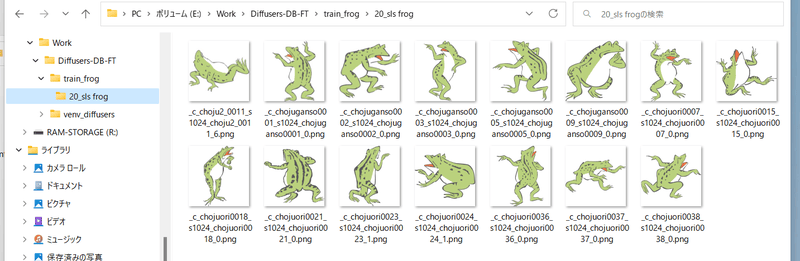
学習用画像を格納するフォルダを作成します。 __さらにその中に__ 、以下の名前でディレクトリを作成します。
|
||||||
|
|
||||||
|
```
|
||||||
|
<繰り返し回数>_<identifier> <class>
|
||||||
|
```
|
||||||
|
|
||||||
|
間の``_``を忘れないでください。
|
||||||
|
|
||||||
|
繰り返し回数は、正則化画像と枚数を合わせるために指定します(後述します)。
|
||||||
|
|
||||||
|
たとえば「sls frog」というプロンプトで、データを20回繰り返す場合、「20_sls frog」となります。以下のようになります。
|
||||||
|
|
||||||
|
|
||||||
|
|
||||||
|
## step 4. 正則化画像の準備
|
||||||
|
正則化画像を使う場合の手順です。使わずに学習することもできます(正則化画像を使わないと区別ができなくなるので対象class全体が影響を受けます)。
|
||||||
|
|
||||||
|
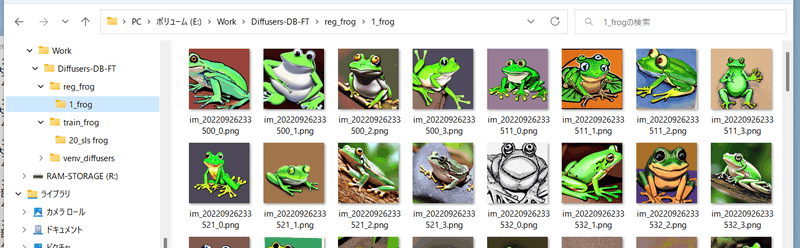
正則化画像を格納するフォルダを作成します。 __さらにその中に__ ``<繰り返し回数>_<class>`` という名前でディレクトリを作成します。
|
||||||
|
|
||||||
|
たとえば「frog」というプロンプトで、データを繰り返さない(1回だけ)場合、以下のようになります。
|
||||||
|
|
||||||
|
|
||||||
|
|
||||||
|
繰り返し回数は「 __学習用画像の繰り返し回数×学習用画像の枚数≧正則化画像の繰り返し回数×正則化画像の枚数__ 」となるように指定してください。
|
||||||
|
|
||||||
|
(1 epochのデータ数が「学習用画像の繰り返し回数×学習用画像の枚数」となります。正則化画像の枚数がそれより多いと、余った部分の正則化画像は使用されません。)
|
||||||
|
|
||||||
|
## step 5. 学習の実行
|
||||||
|
スクリプトを実行します。最大限、メモリを節約したコマンドは以下のようになります(実際には1行で入力します)。
|
||||||
|
|
||||||
|
※LoRA等の追加ネットワークを学習する場合のコマンドは ``train_db.py`` ではなく ``train_network.py`` となります。また追加でnetwork_\*オプションが必要となりますので、LoRAのガイドを参照してください。
|
||||||
|
|
||||||
|
```
|
||||||
|
accelerate launch --num_cpu_threads_per_process 8 train_db.py
|
||||||
|
--pretrained_model_name_or_path=<.ckptまたは.safetensordまたはDiffusers版モデルのディレクトリ>
|
||||||
|
--train_data_dir=<学習用データのディレクトリ>
|
||||||
|
--reg_data_dir=<正則化画像のディレクトリ>
|
||||||
|
--output_dir=<学習したモデルの出力先ディレクトリ>
|
||||||
|
--prior_loss_weight=1.0
|
||||||
|
--resolution=512
|
||||||
|
--train_batch_size=1
|
||||||
|
--learning_rate=1e-6
|
||||||
|
--max_train_steps=1600
|
||||||
|
--use_8bit_adam
|
||||||
|
--xformers
|
||||||
|
--mixed_precision="bf16"
|
||||||
|
--cache_latents
|
||||||
|
--gradient_checkpointing
|
||||||
|
```
|
||||||
|
|
||||||
|
num_cpu_threads_per_processにはCPUコア数を指定するとよいようです。
|
||||||
|
|
||||||
|
pretrained_model_name_or_pathに追加学習を行う元となるモデルを指定します。Stable Diffusionのcheckpointファイル(.ckptまたは.safetensors)、Diffusersのローカルディスクにあるモデルディレクトリ、DiffusersのモデルID("stabilityai/stable-diffusion-2"など)が指定できます。学習後のモデルの保存形式はデフォルトでは元のモデルと同じになります(save_model_asオプションで変更できます)。
|
||||||
|
|
||||||
|
prior_loss_weightは正則化画像のlossの重みです。通常は1.0を指定します。
|
||||||
|
|
||||||
|
resolutionは画像のサイズ(解像度、幅と高さ)になります。bucketing(後述)を用いない場合、学習用画像、正則化画像はこのサイズとしてください。
|
||||||
|
|
||||||
|
train_batch_sizeは学習時のバッチサイズです。max_train_stepsを1600とします。学習率learning_rateは、diffusers版では5e-6ですがStableDiffusion版は1e-6ですのでここでは1e-6を指定しています。
|
||||||
|
|
||||||
|
省メモリ化のためmixed_precision="bf16"(または"fp16")、およびgradient_checkpointing を指定します。
|
||||||
|
|
||||||
|
xformersオプションを指定し、xformersのCrossAttentionを用います。xformersをインストールしていない場合、エラーとなる場合(mixed_precisionなしの場合、私の環境ではエラーとなりました)、代わりにmem_eff_attnオプションを指定すると省メモリ版CrossAttentionを使用します(速度は遅くなります)。
|
||||||
|
|
||||||
|
省メモリ化のためcache_latentsオプションを指定してVAEの出力をキャッシュします。
|
||||||
|
|
||||||
|
ある程度メモリがある場合はたとえば以下のように指定します。
|
||||||
|
|
||||||
|
```
|
||||||
|
accelerate launch --num_cpu_threads_per_process 8 train_db.py
|
||||||
|
--pretrained_model_name_or_path=<.ckptまたは.safetensordまたはDiffusers版モデルのディレクトリ>
|
||||||
|
--train_data_dir=<学習用データのディレクトリ>
|
||||||
|
--reg_data_dir=<正則化画像のディレクトリ>
|
||||||
|
--output_dir=<学習したモデルの出力先ディレクトリ>
|
||||||
|
--prior_loss_weight=1.0
|
||||||
|
--resolution=512
|
||||||
|
--train_batch_size=4
|
||||||
|
--learning_rate=1e-6
|
||||||
|
--max_train_steps=400
|
||||||
|
--use_8bit_adam
|
||||||
|
--xformers
|
||||||
|
--mixed_precision="bf16"
|
||||||
|
--cache_latents
|
||||||
|
```
|
||||||
|
|
||||||
|
gradient_checkpointingを外し高速化します(メモリ使用量は増えます)。バッチサイズを増やし、高速化と精度向上を図ります。
|
||||||
|
|
||||||
|
bucketing(後述)を利用しかつaugmentation(後述)を使う場合の例は以下のようになります。
|
||||||
|
|
||||||
|
```
|
||||||
|
accelerate launch --num_cpu_threads_per_process 8 train_db.py
|
||||||
|
--pretrained_model_name_or_path=<.ckptまたは.safetensordまたはDiffusers版モデルのディレクトリ>
|
||||||
|
--train_data_dir=<学習用データのディレクトリ>
|
||||||
|
--reg_data_dir=<正則化画像のディレクトリ>
|
||||||
|
--output_dir=<学習したモデルの出力先ディレクトリ>
|
||||||
|
--resolution=768,512
|
||||||
|
--train_batch_size=20 --learning_rate=5e-6 --max_train_steps=800
|
||||||
|
--use_8bit_adam --xformers --mixed_precision="bf16"
|
||||||
|
--save_every_n_epochs=1 --save_state --save_precision="bf16"
|
||||||
|
--logging_dir=logs
|
||||||
|
--enable_bucket --min_bucket_reso=384 --max_bucket_reso=1280
|
||||||
|
--color_aug --flip_aug --gradient_checkpointing --seed 42
|
||||||
|
```
|
||||||
|
|
||||||
|
### ステップ数について
|
||||||
|
省メモリ化のため、ステップ当たりの学習回数がtrain_dreambooth.pyの半分になっています(対象の画像と正則化画像を同一のバッチではなく別のバッチに分割して学習するため)。
|
||||||
|
元のDiffusers版やXavierXiao氏のStableDiffusion版とほぼ同じ学習を行うには、ステップ数を倍にしてください。
|
||||||
|
|
||||||
|
(shuffle=Trueのため厳密にはデータの順番が変わってしまいますが、学習には大きな影響はないと思います。)
|
||||||
|
|
||||||
|
## 学習したモデルで画像生成する
|
||||||
|
|
||||||
|
学習が終わると指定したフォルダにlast.ckptという名前でcheckpointが出力されます(DiffUsers版モデルを学習した場合はlastフォルダになります)。
|
||||||
|
|
||||||
|
v1.4/1.5およびその他の派生モデルの場合、このモデルでAutomatic1111氏のWebUIなどで推論できます。models\Stable-diffusionフォルダに置いてください。
|
||||||
|
|
||||||
|
v2.xモデルでWebUIで画像生成する場合、モデルの仕様が記述された.yamlファイルが別途必要になります。v2.x baseの場合はv2-inference.yamlを、768/vの場合はv2-inference-v.yamlを、同じフォルダに置き、拡張子の前の部分をモデルと同じ名前にしてください。
|
||||||
|
|
||||||
|

|
||||||
|
|
||||||
|
各yamlファイルは[https://github.com/Stability-AI/stablediffusion/tree/main/configs/stable-diffusion](Stability AIのSD2.0のリポジトリ)にあります。
|
||||||
|
|
||||||
|
# その他の学習オプション
|
||||||
|
|
||||||
|
## Stable Diffusion 2.0対応 --v2 / --v_parameterization
|
||||||
|
Hugging Faceのstable-diffusion-2-baseを使う場合はv2オプションを、stable-diffusion-2または768-v-ema.ckptを使う場合はv2とv_parameterizationの両方のオプションを指定してください。
|
||||||
|
|
||||||
|
なおSD 2.0の学習はText Encoderが大きくなっているためVRAM 12GBでは厳しいようです。
|
||||||
|
|
||||||
|
Stable Diffusion 2.0では大きく以下の点が変わっています。
|
||||||
|
|
||||||
|
1. 使用するTokenizer
|
||||||
|
2. 使用するText Encoderおよび使用する出力層(2.0は最後から二番目の層を使う)
|
||||||
|
3. Text Encoderの出力次元数(768->1024)
|
||||||
|
4. U-Netの構造(CrossAttentionのhead数など)
|
||||||
|
5. v-parameterization(サンプリング方法が変更されているらしい)
|
||||||
|
|
||||||
|
このうちbaseでは1~4が、baseのつかない方(768-v)では1~5が採用されています。1~4を有効にするのがv2オプション、5を有効にするのがv_parameterizationオプションです。
|
||||||
|
|
||||||
|
## 学習データの確認 --debug_dataset
|
||||||
|
このオプションを付けることで学習を行う前に事前にどのような画像データ、キャプションで学習されるかを確認できます。Escキーを押すと終了してコマンドラインに戻ります。
|
||||||
|
|
||||||
|
※Colabなど画面が存在しない環境で実行するとハングするようですのでご注意ください。
|
||||||
|
|
||||||
|
## Text Encoderの学習を途中から行わない --stop_text_encoder_training
|
||||||
|
stop_text_encoder_trainingオプションに数値を指定すると、そのステップ数以降はText Encoderの学習を行わずU-Netだけ学習します。場合によっては精度の向上が期待できるかもしれません。
|
||||||
|
|
||||||
|
(恐らくText Encoderだけ先に過学習することがあり、それを防げるのではないかと推測していますが、詳細な影響は不明です。)
|
||||||
|
|
||||||
|
## VAEを別途読み込んで学習する --vae
|
||||||
|
vaeオプションにStable Diffusionのcheckpoint、VAEのcheckpointファイル、DiffusesのモデルまたはVAE(ともにローカルまたはHugging FaceのモデルIDが指定できます)のいずれかを指定すると、そのVAEを使って学習します(latentsのキャッシュ時または学習中のlatents取得時)。
|
||||||
|
保存されるモデルはこのVAEを組み込んだものになります。
|
||||||
|
|
||||||
|
## 学習途中での保存 --save_every_n_epochs / --save_state / --resume
|
||||||
|
save_every_n_epochsオプションに数値を指定すると、そのエポックごとに学習途中のモデルを保存します。
|
||||||
|
|
||||||
|
save_stateオプションを同時に指定すると、optimizer等の状態も含めた学習状態を合わせて保存します(checkpointから学習再開するのに比べて、精度の向上、学習時間の短縮が期待できます)。学習状態は保存先フォルダに"epoch-??????-state"(??????はエポック数)という名前のフォルダで出力されます。長時間にわたる学習時にご利用ください。
|
||||||
|
|
||||||
|
保存された学習状態から学習を再開するにはresumeオプションを使います。学習状態のフォルダを指定してください。
|
||||||
|
|
||||||
|
なおAcceleratorの仕様により(?)、エポック数、global stepは保存されておらず、resumeしたときにも1からになりますがご容赦ください。
|
||||||
|
|
||||||
|
## Tokenizerのパディングをしない --no_token_padding
|
||||||
|
no_token_paddingオプションを指定するとTokenizerの出力をpaddingしません(Diffusers版の旧DreamBoothと同じ動きになります)。
|
||||||
|
|
||||||
|
## 任意サイズの画像での学習 --resolution
|
||||||
|
正方形以外で学習できます。resolutionに「448,640」のように「幅,高さ」で指定してください。幅と高さは64で割り切れる必要があります。学習用画像、正則化画像のサイズを合わせてください。
|
||||||
|
|
||||||
|
個人的には縦長の画像を生成することが多いため「448,640」などで学習することもあります。
|
||||||
|
|
||||||
|
## Aspect Ratio Bucketing --enable_bucket / --min_bucket_reso / --max_bucket_reso
|
||||||
|
enable_bucketオプションを指定すると有効になります。Stable Diffusionは512x512で学習されていますが、それに加えて256x768や384x640といった解像度でも学習します。
|
||||||
|
|
||||||
|
このオプションを指定した場合は、学習用画像、正則化画像を特定の解像度に統一する必要はありません。いくつかの解像度(アスペクト比)から最適なものを選び、その解像度で学習します。
|
||||||
|
解像度は64ピクセル単位のため、元画像とアスペクト比が完全に一致しない場合がありますが、その場合は、はみ出した部分がわずかにトリミングされます。
|
||||||
|
|
||||||
|
解像度の最小サイズをmin_bucket_resoオプションで、最大サイズをmax_bucket_resoで指定できます。デフォルトはそれぞれ256、1024です。
|
||||||
|
たとえば最小サイズに384を指定すると、256x1024や320x768などの解像度は使わなくなります。
|
||||||
|
解像度を768x768のように大きくした場合、最大サイズに1280などを指定しても良いかもしれません。
|
||||||
|
|
||||||
|
なおAspect Ratio Bucketingを有効にするときには、正則化画像についても、学習用画像と似た傾向の様々な解像度を用意した方がいいかもしれません。
|
||||||
|
|
||||||
|
(ひとつのバッチ内の画像が学習用画像、正則化画像に偏らなくなるため。そこまで大きな影響はないと思いますが……。)
|
||||||
|
|
||||||
|
## augmentation --color_aug / --flip_aug
|
||||||
|
augmentationは学習時に動的にデータを変化させることで、モデルの性能を上げる手法です。color_augで色合いを微妙に変えつつ、flip_augで左右反転をしつつ、学習します。
|
||||||
|
|
||||||
|
動的にデータを変化させるため、cache_latentsオプションと同時に指定できません。
|
||||||
|
|
||||||
|
## 保存時のデータ精度の指定 --save_precision
|
||||||
|
save_precisionオプションにfloat、fp16、bf16のいずれかを指定すると、その形式でcheckpointを保存します(Stable Diffusion形式で保存する場合のみ)。checkpointのサイズを削減したい場合などにお使いください。
|
||||||
|
|
||||||
|
## 任意の形式で保存する --save_model_as
|
||||||
|
モデルの保存形式を指定します。ckpt、safetensors、diffusers、diffusers_safetensorsのいずれかを指定してください。
|
||||||
|
|
||||||
|
Stable Diffusion形式(ckptまたはsafetensors)を読み込み、Diffusers形式で保存する場合、不足する情報はHugging Faceからv1.5またはv2.1の情報を落としてきて補完します。
|
||||||
|
|
||||||
|
## 学習ログの保存 --logging_dir / --log_prefix
|
||||||
|
logging_dirオプションにログ保存先フォルダを指定してください。TensorBoard形式のログが保存されます。
|
||||||
|
|
||||||
|
たとえば--logging_dir=logsと指定すると、作業フォルダにlogsフォルダが作成され、その中の日時フォルダにログが保存されます。
|
||||||
|
また--log_prefixオプションを指定すると、日時の前に指定した文字列が追加されます。「--logging_dir=logs --log_prefix=db_style1_」などとして識別用にお使いください。
|
||||||
|
|
||||||
|
TensorBoardでログを確認するには、別のコマンドプロンプトを開き、作業フォルダで以下のように入力します(tensorboardはDiffusersのインストール時にあわせてインストールされると思いますが、もし入っていないならpip install tensorboardで入れてください)。
|
||||||
|
|
||||||
|
```
|
||||||
|
tensorboard --logdir=logs
|
||||||
|
```
|
||||||
|
|
||||||
|
その後ブラウザを開き、http://localhost:6006/ へアクセスすると表示されます。
|
||||||
|
|
||||||
|
## 学習率のスケジューラ関連の指定 --lr_scheduler / --lr_warmup_steps
|
||||||
|
lr_schedulerオプションで学習率のスケジューラをlinear, cosine, cosine_with_restarts, polynomial, constant, constant_with_warmupから選べます。デフォルトはconstantです。lr_warmup_stepsでスケジューラのウォームアップ(だんだん学習率を変えていく)ステップ数を指定できます。詳細については各自お調べください。
|
||||||
|
|
||||||
|
## 勾配をfp16とした学習(実験的機能) --full_fp16
|
||||||
|
full_fp16オプションを指定すると勾配を通常のfloat32からfloat16(fp16)に変更して学習します(mixed precisionではなく完全なfp16学習になるようです)。
|
||||||
|
これによりSD1.xの512x512サイズでは8GB未満、SD2.xの512x512サイズで12GB未満のVRAM使用量で学習できるようです。
|
||||||
|
|
||||||
|
あらかじめaccelerate configでfp16を指定し、オプションで ``mixed_precision="fp16"`` としてください(bf16では動作しません)。
|
||||||
|
|
||||||
|
メモリ使用量を最小化するためには、xformers、use_8bit_adam、cache_latents、gradient_checkpointingの各オプションを指定し、train_batch_sizeを1としてください。
|
||||||
|
|
||||||
|
(余裕があるようならtrain_batch_sizeを段階的に増やすと若干精度が上がるはずです。)
|
||||||
|
|
||||||
|
PyTorchのソースにパッチを当てて無理やり実現しています(PyTorch 1.12.1と1.13.0で確認)。精度はかなり落ちますし、途中で学習失敗する確率も高くなります。
|
||||||
|
学習率やステップ数の設定もシビアなようです。それらを認識したうえで自己責任でお使いください。
|
||||||
|
|
||||||
|
# その他の学習方法
|
||||||
|
|
||||||
|
## 複数class、複数対象(identifier)の学習
|
||||||
|
方法は単純で、学習用画像のフォルダ内に ``繰り返し回数_<identifier> <class>`` のフォルダを複数、正則化画像フォルダにも同様に ``繰り返し回数_<class>`` のフォルダを複数、用意してください。
|
||||||
|
|
||||||
|
たとえば「sls frog」と「cpc rabbit」を同時に学習する場合、以下のようになります。
|
||||||
|
|
||||||
|
|
||||||
|
|
||||||
|
classがひとつで対象が複数の場合、正則化画像フォルダはひとつで構いません。たとえば1girlにキャラAとキャラBがいる場合は次のようにします。
|
||||||
|
|
||||||
|
- train_girls
|
||||||
|
- 10_sls 1girl
|
||||||
|
- 10_cpc 1girl
|
||||||
|
- reg_girls
|
||||||
|
- 1_1girl
|
||||||
|
|
||||||
|
データ数にばらつきがある場合、繰り返し回数を調整してclass、identifierごとの枚数を統一すると良い結果が得られることがあるようです。
|
||||||
|
|
||||||
|
## DreamBoothでキャプションを使う
|
||||||
|
学習用画像、正則化画像のフォルダに、画像と同じファイル名で、拡張子.caption(オプションで変えられます)のファイルを置くと、そのファイルからキャプションを読み込みプロンプトとして学習します。
|
||||||
|
|
||||||
|
※それらの画像の学習に、フォルダ名(identifier class)は使用されなくなります。
|
||||||
|
|
||||||
|
各画像にキャプションを付けることで(BLIP等を使っても良いでしょう)、学習したい属性をより明確にできるかもしれません。
|
||||||
|
|
||||||
|
キャプションファイルの拡張子はデフォルトで.captionです。--caption_extensionで変更できます。--shuffle_captionオプションで学習時のキャプションについて、カンマ区切りの各部分をシャッフルしながら学習します。
|
||||||
|
|
||||||
1282
train_network.py
1282
train_network.py
File diff suppressed because it is too large
Load Diff
@@ -10,9 +10,7 @@
|
|||||||
|
|
||||||
cloneofsimo氏のリポジトリ、およびd8ahazard氏の[Dreambooth Extension for Stable-Diffusion-WebUI](https://github.com/d8ahazard/sd_dreambooth_extension)とは、現時点では互換性がありません。いくつかの機能拡張を行っているためです(後述)。
|
cloneofsimo氏のリポジトリ、およびd8ahazard氏の[Dreambooth Extension for Stable-Diffusion-WebUI](https://github.com/d8ahazard/sd_dreambooth_extension)とは、現時点では互換性がありません。いくつかの機能拡張を行っているためです(後述)。
|
||||||
|
|
||||||
WebUI等で画像生成する場合には、学習したLoRAのモデルを学習元のStable Diffusionのモデルに、このリポジトリ内のスクリプトであらかじめマージしておく必要があります。マージ後のモデルファイルはLoRAの学習結果が反映されたものになります。
|
WebUI等で画像生成する場合には、学習したLoRAのモデルを学習元のStable Diffusionのモデルにこのリポジトリ内のスクリプトであらかじめマージしておくか、こちらの[WebUI用extention](https://github.com/kohya-ss/sd-webui-additional-networks)を使ってください。
|
||||||
|
|
||||||
なお当リポジトリ内の画像生成スクリプトで生成する場合はマージ不要です。
|
|
||||||
|
|
||||||
## 学習方法
|
## 学習方法
|
||||||
|
|
||||||
@@ -24,7 +22,7 @@ DreamBoothの手法(identifier(sksなど)とclass、オプションで正
|
|||||||
|
|
||||||
### DreamBoothの手法を用いる場合
|
### DreamBoothの手法を用いる場合
|
||||||
|
|
||||||
note.com [環境整備とDreamBooth学習スクリプトについて](https://note.com/kohya_ss/n/nba4eceaa4594) を参照してデータを用意してください。
|
[DreamBoothのガイド](./train_db_README-ja.md) を参照してデータを用意してください。
|
||||||
|
|
||||||
学習するとき、train_db.pyの代わりにtrain_network.pyを指定してください。
|
学習するとき、train_db.pyの代わりにtrain_network.pyを指定してください。
|
||||||
|
|
||||||
@@ -110,7 +108,7 @@ python networks\merge_lora.py --sd_model ..\model\model.ckpt
|
|||||||
|
|
||||||
### 複数のLoRAのモデルをマージする
|
### 複数のLoRAのモデルをマージする
|
||||||
|
|
||||||
結局のところSDモデルにマージしないと推論できないのであまり使い道はないかもしれません。ただ、複数のLoRAモデルをひとつずつSDモデルにマージしていく場合と、複数のLoRAモデルをマージしてからSDモデルにマージする場合とは、計算順序の関連で微妙に異なる結果になります。
|
複数のLoRAモデルをひとつずつSDモデルに適用する場合と、複数のLoRAモデルをマージしてからSDモデルにマージする場合とは、計算順序の関連で微妙に異なる結果になります。
|
||||||
|
|
||||||
たとえば以下のようなコマンドラインになります。
|
たとえば以下のようなコマンドラインになります。
|
||||||
|
|
||||||
@@ -144,6 +142,40 @@ gen_img_diffusers.pyに、--network_module、--network_weights、--network_dim
|
|||||||
|
|
||||||
--network_mulオプションで0~1.0の数値を指定すると、LoRAの適用率を変えられます。
|
--network_mulオプションで0~1.0の数値を指定すると、LoRAの適用率を変えられます。
|
||||||
|
|
||||||
|
## 二つのモデルの差分からLoRAモデルを作成する
|
||||||
|
|
||||||
|
[こちらのディスカッション](https://github.com/cloneofsimo/lora/discussions/56)を参考に実装したものです。数式はそのまま使わせていただきました(よく理解していませんが近似には特異値分解を用いるようです)。
|
||||||
|
|
||||||
|
二つのモデル(たとえばfine tuningの元モデルとfine tuning後のモデル)の差分を、LoRAで近似します。
|
||||||
|
|
||||||
|
### スクリプトの実行方法
|
||||||
|
|
||||||
|
以下のように指定してください。
|
||||||
|
```
|
||||||
|
python networks\extract_lora_from_models.py --model_org base-model.ckpt
|
||||||
|
--model_tuned fine-tuned-model.ckpt
|
||||||
|
--save_to lora-weights.safetensors --dim 4
|
||||||
|
```
|
||||||
|
|
||||||
|
--model_orgオプションに元のStable Diffusionモデルを指定します。作成したLoRAモデルを適用する場合は、このモデルを指定して適用することになります。.ckptまたは.safetensorsが指定できます。
|
||||||
|
|
||||||
|
--model_tunedオプションに差分を抽出する対象のStable Diffusionモデルを指定します。たとえばfine tuningやDreamBooth後のモデルを指定します。.ckptまたは.safetensorsが指定できます。
|
||||||
|
|
||||||
|
--save_toにLoRAモデルの保存先を指定します。--dimにLoRAの次元数を指定します。
|
||||||
|
|
||||||
|
生成されたLoRAモデルは、学習したLoRAモデルと同様に使用できます。
|
||||||
|
|
||||||
|
Text Encoderが二つのモデルで同じ場合にはLoRAはU-NetのみのLoRAとなります。
|
||||||
|
|
||||||
|
### その他のオプション
|
||||||
|
|
||||||
|
- --v2
|
||||||
|
- v2.xのStable Diffusionモデルを使う場合に指定してください。
|
||||||
|
- --device
|
||||||
|
- ``--device cuda``としてcudaを指定すると計算をGPU上で行います。処理が速くなります(CPUでもそこまで遅くないため、せいぜい倍~数倍程度のようです)。
|
||||||
|
- --save_precision
|
||||||
|
- LoRAの保存形式を"float", "fp16", "bf16"から指定します。省略時はfloatになります。
|
||||||
|
|
||||||
## 追加情報
|
## 追加情報
|
||||||
|
|
||||||
### cloneofsimo氏のリポジトリとの違い
|
### cloneofsimo氏のリポジトリとの違い
|
||||||
|
|||||||
Reference in New Issue
Block a user